What the radar does
On the tram, instead of the news portal, I read my own radar - news that interests me and moves me forward.
I unlock my phone and there are at most twenty cards waiting for me, from people with thought-provoking ideas. In Czech. No ads.
Every morning at seven, the radar fetches what's new from the people I follow in my field - blogs, podcasts, tweets and so on. A model sorts it and translates anything in English into Czech. I give it a thumbs up or down and write one sentence on why. Five minutes.
What it's made of
The radar has three main parts: collection, a filter and the page where I read.
Collection runs every morning in three waves. At 7:00 it pulls new posts from blogs and podcasts via RSS. At 7:15 it searches the web for people who don't have RSS. At 7:30 it fetches tweets from the people I follow. If one wave fails, the others keep going.
The filter is a small language model. It reads what came in and decides whether to show it to me at all. It follows rules that grew out of my own rejections. Whatever it throws out, it stores together with the reason.
The page where I read is an ordinary web page behind a password. For every item I give a thumbs up or down and write one sentence on why. Those sentences then become the rules for the filter. The items I want to keep working with are picked up by my Claude in Obsidian.
The whole thing runs on a small rented server. Not for performance. I want to go through the news whenever I like, not only when my computer is on with Claude running. On the server, the radar keeps collecting while I sleep, and I open it on my phone on the tram just as easily as on my laptop.
What the radar looks like
The radar has four tabs.
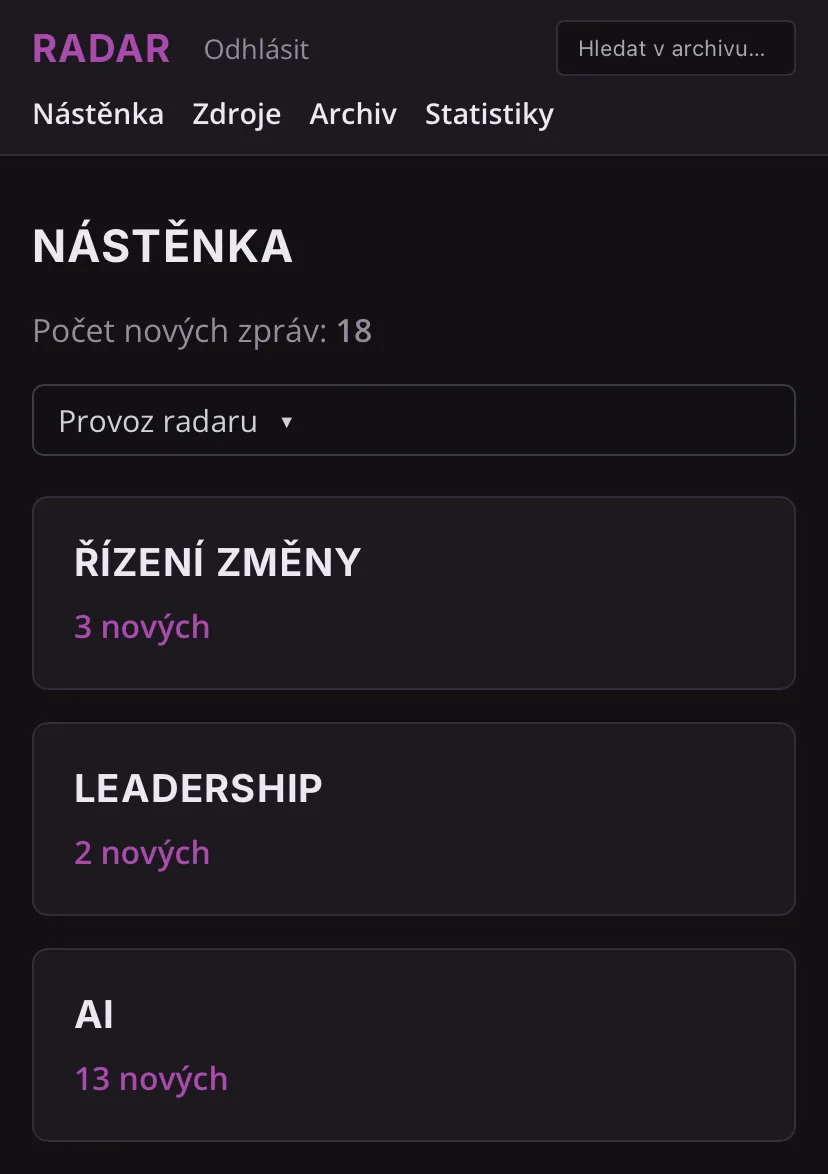
Dashboard is what I open in the morning on the tram. New items are split into the three areas I follow: change management, leadership and AI news. At the top I see status messages: how much came in today from articles and how much from X, whether any morning run failed, and how much of the monthly cap I've used. I don't have to look for anything. If something isn't working, the radar tells me itself.
When I open an item, I decide. Thumbs down and one sentence on why. Thumbs up has two options: "just a good source" or "I want to keep working on this". The second one sends the item, with my note, to Obsidian, where my Claude picks it up the next time I work.
Sources are the people, websites and topics I follow. For each one I can add an RSS feed or an X account right away, and I can see when the radar last checked it. I enter topics in both English and Czech so the radar finds both. When I want to follow a new area, I add it here.
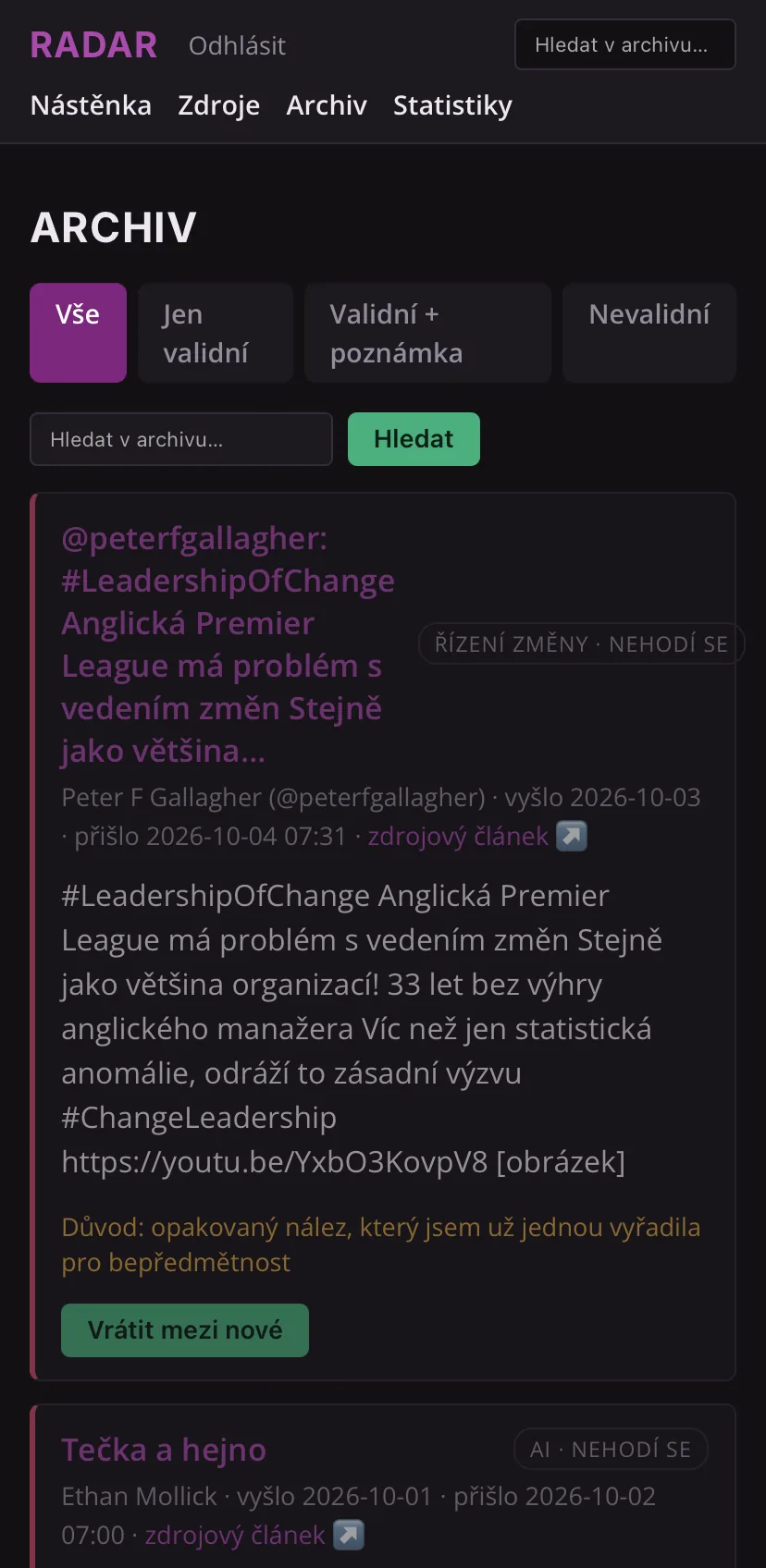
Archive holds everything I've ever rated, thumbs up and down. I can search it and filter it by how I decided. If I realise I rejected something for no good reason, one click puts it back among the new items. It also lets me look up information on whatever topic I'm interested in at the moment.
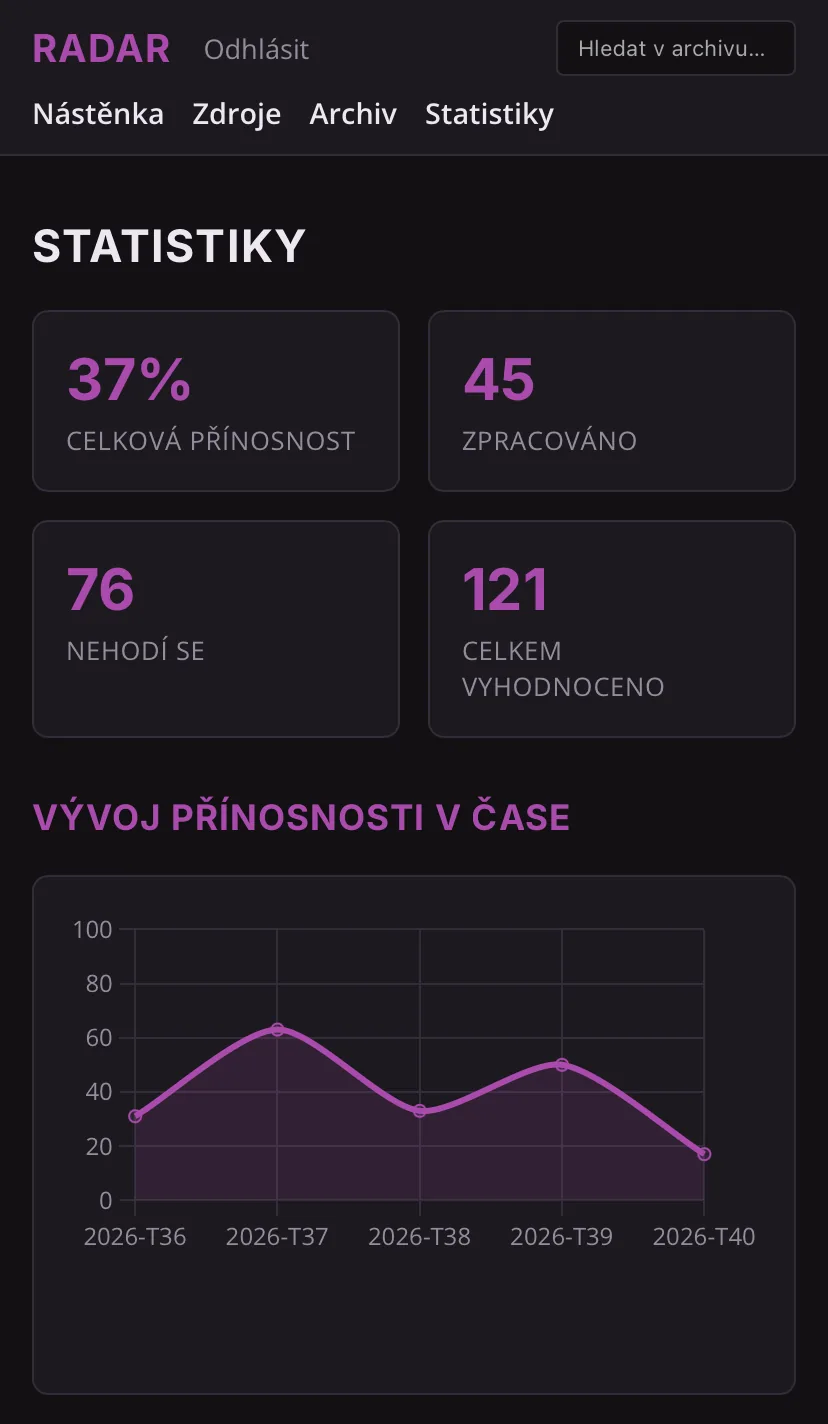
Statistics show me what share of items is relevant to me and how that number changes week by week. Plus a breakdown by area, by format (article, podcast, tweet), by website, and my favourite sources. What I watch most is the weekly trend. When the curve goes up, the radar is learning. When it goes down, like in the last week in the screenshot, it's my signal to take a look at the rules and the sources.
How to build it, step by step
This is how I would build the radar today, with everything I learned in three weeks of building and months of running it.
1. Write down the people and topics you want to know about
You need specific names, blogs, podcasts and the questions you care about.
2. Build with an AI assistant that writes the code for you
I built the radar with Claude Code. I describe what I want, it writes the code, I try it out, and when something isn't right, I send it back. My job was to say what the radar should do and what it must not do.
3. Rent a small server and secure it
With a server you can read the news any time, even when your computer is off and Claude isn't running. If you don't have a Mac Mini running at home, you can do what I did and rent one from Hetzner in Helsinki for €6.64 a month. On my iPhone the radar wouldn't open without an encrypted connection. An encrypted connection needs an address with a name, not just the server's number. sslip.io gives me one for free, and Let's Encrypt issues the certificate for it, also for free. I didn't want a subdomain of my website. The radar is just for me, and an address without my name doesn't link me to it.
I sat down to deal with security properly after a message in a community I belong to, where someone described seeing in their server logs how somebody was systematically searching for a file with keys. It wasn't about them personally - this is tried across the board on everything visible on the internet. Since then:
- the page is behind a password, and after three wrong attempts the address is locked out for an hour,
- I log in to the server with a key only,
- the firewall lets through only the website and my login,
- the app doesn't run as the server administrator but under its own restricted user,
- security updates install themselves.
And I regularly have a stronger model, such as Fable 5, independently review the code and the security.
4. Collect as cheaply as you can
- RSS is free and needs no model. Anyone with a blog or a podcast usually has RSS too. Start here.
- Web search is done by the Claude model with a search tool. It's the most expensive part - you pay for every query. That's why mine only searches for people who don't have RSS, and they take turns: each one comes up once every five days.
- Tweets come through twitterapi.io, without an X account. You register by email; I prepaid $10 of credit and it lasts a very long time.
With tweets I didn't get it right the first time. I asked for each person's last twenty tweets separately and paid even for people who hadn't posted anything that day. Now I ask in a single query: what did they post in the last 24 hours? Only what they actually posted comes back. It works out roughly fifteen times cheaper.
5. Set a spending cap before you switch the radar on
Your cost estimate will be off. Mine was, several times. So the radar counts every model call and has a monthly cap. When it goes over, it stops itself and lets me know. The second safeguard is a spending limit directly in my Anthropic account, with automatic credit top-ups switched off.
6. Before you let AI throw anything out, teach it with examples
This is where I would do things differently today.
I only taught the filter once it was already running. The rules grew out of the sentences I wrote for rejected items. It works, but at first things slipped through the cracks without me knowing.
It's better to start beforehand. Before you let the filter run for real, put together a set of real examples. For each one, write yes, no or maybe - and above all why. Then go through the set with the model. Let it judge each example on its own while you comment on and correct its decisions. Only let it loose on new data once it gets them right.
My filter now decides in exactly those three levels. A yes goes on my reading list. A no is thrown out together with the reason. And a maybe sits separately, so I can see where the model hesitated and review it later.
7. Store what the AI threw out, along with the reason
When you let a model filter things out, you create a new risk: you don't know what disappeared. In my radar, every rejected item is stored with a sentence on why it was dropped, and I can pull it back for fourteen days. I go through it regularly to check whether the filter is throwing out something I'd want to see and work with.
Watch out for overload too. The first time I pulled in tweets without a filter, I got more than a hundred in a single day. That's not how I want to work with information, so there are never more than 20 unread items waiting for me across all areas.
8. Teach the radar in your own words
For every rejected item I write one sentence on why. For example "event invitations don't interest me" or "the latest Claude Code update is irrelevant to me". Every now and then those sentences are read together and turned into rules the filter uses next time. I keep the rules in my own Obsidian and send them to the server. If the server disappeared, I'd still have the rules.
9. Let the radar speak up when something breaks
Every morning at 8:30 the server checks itself and only speaks up when something is wrong: a service isn't running, a certificate is about to expire, a library has a known security flaw. When everything is fine, it stays quiet. Alerts reach me through ntfy and, to be safe, as a pop-up window on my Mac.
What it costs and what's free
| Item | Per month | Note |
|---|---|---|
| Server (Hetzner) | €6.64 | runs non-stop |
| Model (Claude): search, filter, translation | about $8 | $10 cap, then the radar stops |
| Tweets (twitterapi.io) | about $0.13 | prepaid credit |
Web search is the most expensive part. It eats almost four fifths of the spend and brings in one or two finds a day. At the start the radar cost me $2.25 a day. Then I swapped the large model for a small one and cut out the places where the model was thinking for no reason. The cost dropped to a fraction.
Where I stumbled
In the first seven days I burned through $19.40 without knowing it. I found out from my account balance. There were 57 cents left. Coming from Haná in Moravia, I have no desire to burn money on a tool mindlessly. That's why the cap is there now.
When the model made the decisions, the radar found nothing. In the first version I let the model judge what was good enough to show me. First run: nothing. Second: nothing. Third: nothing either. We had set the bar too high. I took the filter out of collection, and for blogs and search I decide. For tweets I brought it back later.
On the first day with Twitter, 137 tweets poured in. I had capped the money, but not the inflow. I went through 24 of them, rejected three out of four and then gave up. That's how the tweet filter and the cap of twenty unread items came about - also as a defence against information overload.
The model silently skipped ten tweets out of eleven. It happened in September during translation. It reported nothing; the log just said "translated 1 of 11". I only noticed because of the English cards. Today the radar catches up on untranslated items and reports every such failure to me.
My AI assistant printed both of my API keys into the chat. Keys are the passwords the radar uses to access the model and the tweet service, and to pay for them. While building, Claude Code listed the running processes, and the keys were part of a command. And yet the rule "never put a key in the chat" was built into it. Both keys had to be replaced. AI mistakes happen sometimes, even when you've got things covered. Unfortunately. You have to keep it in mind. A key must never be part of a command.
Does it work?
In the first two weeks I went through 79 items and kept 32 - that's 41%. For tweets, the share of relevant items rose with the filter from a quarter to 42%. I now treat tweets as my main information stream.