I thought I didn't have that many ideas
My notes lived in two places. One pile in Notion and over 1,500 notes in Apple Notes, collected over years without a single folder. Shopping lists next to meeting notes, next to things that really mattered to me. I didn't know what was actually in there.
First, I left the cloud, because I wanted my notes with me. I moved Notion over to Obsidian, where notes are plain text files on my own disk. That part was easy.
Then came the pile from Apple Notes. It wasn't enough to move it and hope I'd find my way around. I had to go through every single note and decide whether it had a home or had to go. Over seven hundred of them went in the bin.
And then, in that pile, I found 210 poems, 65 reflections and 10 short stories that I had written over the years and had almost forgotten about.
I didn't lack ideas. I just never worked with them.
Today they're material for my book and for what I put out into the world. And for the first time, everything is in one place.
That's the foundation of the whole second brain. Claude Code is only as good as the database of information across your note system, in my case Obsidian. Without it, it's blind.
And the system that helped me find those texts now helps me with my podcast, my course, my book and my business.
What a second brain does
The easiest way to show it is what happens when something occurs to me.
I say it. I dictate it into my phone with the dictation app Uttero, anytime and anywhere, without sorting it. I get it out of my head so I can work with it later, whenever I want. These things used to get lost.
It takes it apart. The brain doesn't file the idea straight away. First it talks it through with me. It asks questions, pushes back, shows me what's in it. It knows all of my work, so it sees connections I don't.
It puts it to use. It files it where something can come of it. Not into an "ideas" folder, but into the book, the course, my to-dos or the prep for the next podcast guest. And it links it to everything it relates to.
And it learns. Whenever I edit something or give it a different angle, it takes note. I don't have to remind it.
Here's a real example. At 9:18 pm, just before going to sleep, I dictated into my phone:
"I'm thinking one chapter of the book could be called 'Sort of About Silence', because silence is part of change… That moment just before you jump into the water."
The brain pushed back. It said this wasn't just an idea for a chapter, but a gap in the middle of the model my book is built on. Between "I can't go on like this" and "I'm jumping", I was missing a whole phase. That voice note turned into a new chapter of the book, a new block in my course for companies and a new question I now ask every podcast guest.
What it's made of
A second brain has three parts.
A folder of notes. Everything I do lives in plain text files on my own computer. Podcast, book, course, business, any kind of source. I look at them through Obsidian. The app is just a window. If it disappeared tomorrow, my notes would still be here and I could open them with anything.
Artificial intelligence that lives in that folder. I use Claude Code. It doesn't only see what I happen to type to it. It sees all of my work at once. That's why it can tell me things I wouldn't connect myself.
Instructions and memory. The workflows we've fine-tuned together are called skills. I say "process the episode" and it knows where to look and what belongs to it. On top of that, it remembers facts about me and my work. The more of them I give it, the less I have to explain.
How I've organised it
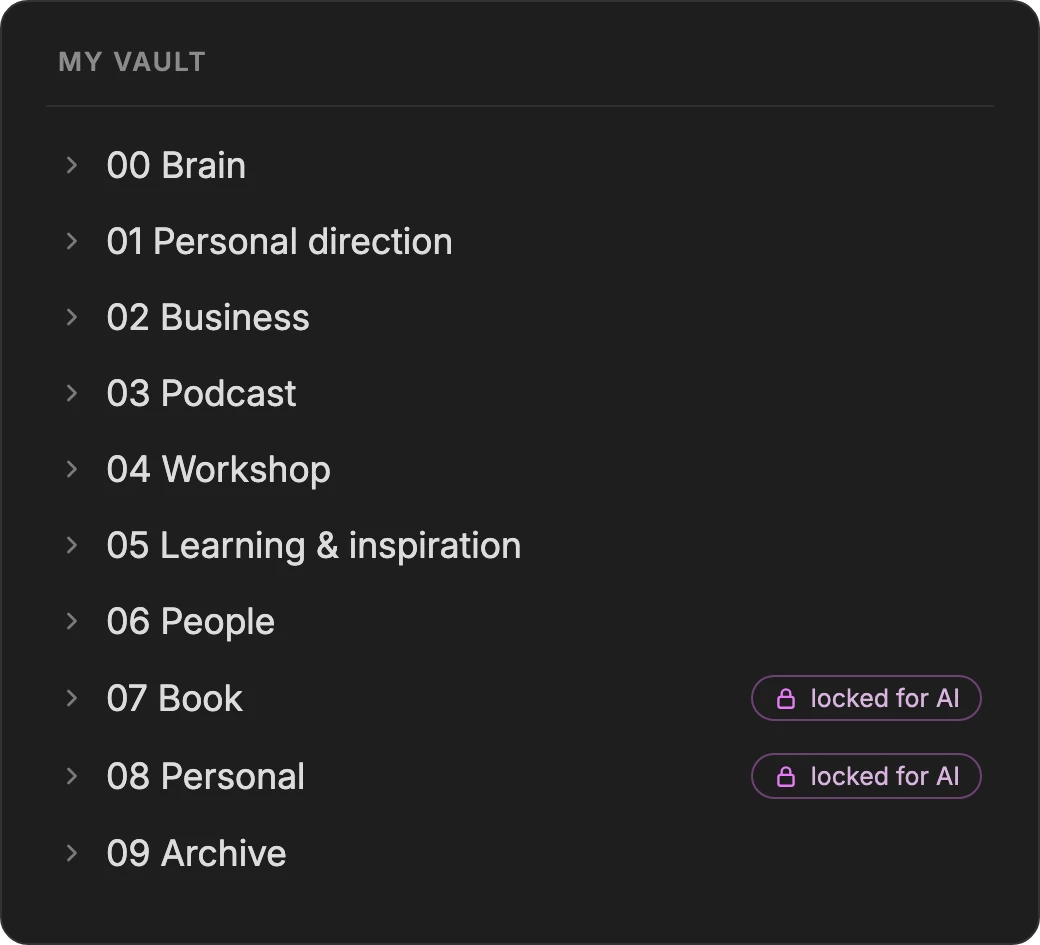
I have ten folders and I don't need more. The structure follows my life, not some theory.
What it actually does for me
I don't need to know any commands. I just say what I want.
- It gives me a plan in the morning. When I start it, it greets me with an overview of what's coming up that week, what's urgent and what's waiting unprocessed in my Inbox.
- Weekly priorities. It sorts my tasks by urgency and importance and makes sure work on my own business doesn't get buried under urgent things.
- Podcast episodes. Transcript, artwork, episode description, short videos for social media with subtitles.
- Editing my writing. I write my posts myself. It pushes back on them.
- Texts. It suggests a structure for newsletters and the website. I then adapt them my way.
- My course on change. Stories from the podcast and news from the field as teaching material.
- My own tools. With it, I've built tools for transcripts, edits, short videos, visuals and cards for posts.
- Material for the book. Material from interviews, a map of people for the chapters.
- News from my field. Through my own AI radar, which I built myself.
- Sparring. When I'm deciding on a direction, it calls an advisory circle. Five voices, each pushing back from a different side, for example a marketing, a process or a financial advisor.
Where it may not go
For me, this is the most important part of the whole system.
A system without boundaries isn't a helper. It's an intruder.
- Into the manuscript of my book. That's my own work. It may bring me material, but it will never write it.
- Into my social media writing. I write my posts. It reads them like an experienced editor. It shows me where my opening is weak and where I repeat myself. But it won't write a sentence for me.
- Into my personal things. It doesn't set foot there. At all.
And it isn't just a request. For the book and the personal folder, these are locked doors in the Claude Code settings. If it tries to reach in there, the system won't let it. That applies always, whether it wants to or not.
On top of that, it never changes anything quietly. Whatever it wants to change, it shows me first and waits for my yes. And everything can be undone. For every change, it notes down how to reverse it.
How to build it, step by step
This is how I'd build a second brain today, with everything I've learned over roughly five months.
- 1Choose one place
- 2Pour in everything you have scattered around
- 3Create a rough structure based on your life
- 4Tell it who you are and where you're heading
- 5Set up a place where everything raw lands
- 6Set boundaries before you let AI into your notes
- 7Don't build the whole system at once. Start where you know
- 8Teach it with your edits
- 9Back it up
1. Choose one place
One. Not five apps where you then search for where you wrote it. I went with Obsidian, because I want my notes with me, not in the cloud. If you want AI to see into them, choose a place where notes are plain text files. Moving from Notion is easy, Obsidian has the Importer plugin for it.
Connect it to Claude Code. You install Claude Code following the guide from Anthropic and run it from the terminal. When you start it in the folder with your notes, it can see into them and work with them. I made myself a shortcut: I type "mozek" (Czech for "brain") into the terminal and Claude starts straight away with my whole memory and access to my notes.
2. Pour in everything you have scattered around
Notes from your phone, from Notion, from paper. Everything into one pile, and then go through it. It's a chore, but you only do it once.
With a big pile, AI helps. It sorted over a thousand notes into heaps by where they belong, and I then confirmed them in batches.
3. Create a rough structure based on your life
Eight to ten folders based on what you actually do, not on a textbook. An imperfect structure you live in is better than a perfect one you keep working around.
If you don't know where to start, have a look at the PARA method by Tiago Forte, the author of Building a Second Brain. It divides notes into projects, areas, resources and archive.
4. Tell it who you are and where you're heading
The more AI knows about you, the more it can connect for you. My brain has my strategy loaded, my positioning, what I want in life, what I do and what I've done. Thanks to that, it never gives me anything generic about an idea. It connects it to what I'm working on.
And don't be afraid to stop it. When it explains something I don't understand, I tell it: talk to me in plain words.
5. Set up a place where everything raw lands
One folder called "Inbox". When something occurs to you, you drop it in there and don't sort it. Sorting comes later. Of everything I've introduced, this habit has helped me the most.
I dictate with the Uttero app. I start it with an iPhone Shortcut and the transcribed text is saved straight into the Inbox in Obsidian. To sync between my phone and computer, I use Obsidian Sync, because it's encrypted for me alone.
6. Set boundaries before you let AI into your notes
Think about where AI may not go. And don't rely only on a request in the text. AI can work around a rule in the heat of the moment, a lock it can't.
A lock on folders. Claude Code has a settings file (
~/.claude/settings.json). In it, you list the forbidden folders and, for each one, three prohibitions: reading, editing and writing. It looks like this, for example:"permissions": { "deny": [ "Read(//Users/your-name/Obsidian/Personal/**)", "Edit(//Users/your-name/Obsidian/Personal/**)", "Write(//Users/your-name/Obsidian/Personal/**)" ] }You don't have to write it yourself. Just tell Claude "lock my Personal folder so you can't read or write in it" and it will add it to the settings.
A second lock on the terminal. The read ban only covers Claude's own file reading. But a folder can also be reached through commands in the terminal. That's why I also have a small guard, a so-called hook. Before every command, it checks whether the command is heading into a locked folder. If it is, it stops it before it runs.
Check that it holds. Once it's set up, deliberately ask Claude to read something from the locked folder. It should be refused. Only then do you know the lock works.
7. Don't build the whole system at once. Start where you know
At the beginning, I only had a rough idea. So I started where I wanted to replace an external tool and make my work simpler. And with things I knew how they should look: episode transcripts and descriptions. Then more came along, not planned at a desk, but as I needed it. The skills started connecting and the brain picked up my context along the way. What you're missing only shows up in real work.
8. Teach it with your edits
When the brain suggests something and I rewrite it, it notes down what didn't work for me. I have a page called "My voice" for this, describing how I write and speak, and a folder with examples of what I rewrote after it and why. Before it prepares anything for me, it reads it. That way I don't have to repeat myself.
The second thing it watches is work we keep doing over and over. I call it OHIO, "only handle it once". When it notes down what we've done together, it checks whether we're doing the same manual work for the second or third time. If so, it asks whether to simplify or automate it. For example, after an episode came out, we moved the guest prep to the finished episode by hand three times. Then I said enough, and today the brain offers it on its own the moment an episode is released. But the decision is always mine.
9. Back it up
The original is on my own computer. Once a week, the whole system, notes, skills and memory, backs itself up to the cloud. If my Mac burned down, I wouldn't lose anything.
What it costs and what's free
| Item | Per month | Note |
|---|---|---|
| Obsidian | free | note-taking app |
| Obsidian Sync | $5 | only if you want your notes on your phone too |
| Claude (Claude Code) | depends on the plan | subscription, you don't pay per question |
What I'm still fine-tuning
This system isn't finished and never will be. It grows out of where something is missing, and sometimes out of what stopped working for me.
I still keep a few important notes on paper in a Moleskine. I want to photograph them with my phone, have them transcribed and keep working with them in Obsidian. That's still waiting. There's nothing strategic in there and I have it written down, so it won't get lost.
Where I stay in all this
I didn't notice this at all at the start. Today it matters more to me than the whole system.
The more I work with the brain, the more I step back and look at where I need to be.
I see two extremes: doing everything with artificial intelligence, or doing everything slowly, with a clay tablet. And I'm looking for where I am between them. What belongs to me. Where I decide.
I know the temptation. "Give me four options. I'll take A, develop it. I'm off to do the shopping." But maybe that way we lose a piece of creativity. The chance to solve problems our own way and come up with something artificial intelligence can't think up.
AI has its libraries. It's still ones and zeros. I want something else from it: give me a different angle, show me what I'm not thinking about. But before that, I think it through myself. Sometimes I give myself a day and think an idea over before I even start talking about it with Claude.
It gives options. I decide. Whether it's about direction, the course or inspiration from others, I get options, not decisions. And I decide within options I set myself. I don't let artificial intelligence decide for me.
It's a tool. But where do I begin and end as a human? More and more, I'm aware of three essentials. And all three are mine, not its:
- Creativity. The idea has to come from me. Nobody can come up with it for me.
- Critical thinking. I get options. But which one is good, I recognise from my own experience. I sense it. A language model has the limits of its libraries. I have a life behind me.
- What makes me me. My voice, my boundaries, my decisions. That can't be delegated.
Does it work?
In roughly five months, the brain remembers over a hundred and forty things about me and my work, and over ninety people from the podcast, business and my network. It knows over twenty workflows I can start with a single word.
The work is faster, and precisely because of that, it's becoming ever clearer what's mine and what's its.
The more I create with it, the more clearly I see myself.